Programmer Hardware
Programmer Overview
PICPgm supports all kind of serial port programmers as well as parallel port programmers. The most popular PIC programmers (e.g. JDM, Tait, Microchip AN589 programmer, ...) are pre-configured and will be automatically detected by the software. In the table below, you will find a list of all nativly supported programmers.
| Programmer Name | Connection | Low-/High-Voltage |
| | LPT (parallel port) | Low-Voltage |
| | USB | Low-Voltage |
| | LPT (parallel port) | High-Voltage |
| | LPT (parallel port) | High-Voltage |
| | COM (serial port) | High-Voltage |
| | COM (serial port) | High-Voltage |
| | LPT (parallel port) | High-Voltage |
| | LPT (parallel port) | High-Voltage |
| | LPT (parallel port) | Low-Voltage |
| | LPT (parallel port) | High-Voltage |
| | LPT (parallel port) | High-Voltage |
But this are not all programmers which can be used with PICPgm. As mentioned earlier, it supports nearly all serial and parallel port programmers. This is possible because PICPgm offers a feature to configure the programmer pins via the graphical user interface directly by the user. You can find this configuration in the menu bar of PICPgm: Hardware => Hardware Selection/Configuration.
PICPgm LVISP (Low-Voltgage, In-System Programmer) Description
PICPgm LVISP is a Low-Voltgage, In-System Programmer. It is conneteced to the PC via the parallel port (LPT port).
Note: The +5V supply for the programmer is take from the target board (via +5V pin on the programmer cable), i.e. the target board has to be powered to allow programming.
Schematics / Layouts
PIC circuit for usage with LVISP programmer
To be able to use the LVISP progammer, the following minimum PIC circuit is necessary on your target board. Please not that the PGM pin of the PIC cannot be used in case Low-Voltage programming is used. This pin must always be tied to GND for proper operation!
Pictures
The Low-Voltage Programmer is very small. It fits into a Sub-D connector box: Here is a picture of the complete Low-Voltage Programmer cable:

PICPgm USB Programmer
Description
The PICPgm USB Programmer is a Low-Voltgage, In-System Programmer. It uses a FT245BL chip from FTDI. This chip provides a Parallel IO port via USB. The PICPgm Software uses the Bit Bang Mode feature of the FT245BL to contol the PIC programming pins.
This programmer allows programming of PICs with PCs which have no parallel port or serial port. Unfortunately, due to the limitations of the USB bus, read operations from the PIC are very slow with this programmer. So I would suggest to use this programmer only to program a bootloader into the PIC. Further programming can be done after that via the bootloader which might be much faster.
Schematics / Layouts
Microchip AN589 Programmer
Description
The Microchip AN589 Programmer is a High-Voltage Programmer. It is connected to the PC via the parallel port (LPT port). This programmer has been designed by Microchip as a low cost programmer for the PIC16C84. Nevertheless, it also supports all PICs which can be programmed in High-Voltage mode. All details regarding this programmer can be found in Application Note AN589 from Microchip.
Schematics / Layouts
Tait Classic PIC Programmer - (c) David Tait
Description
The Tait Classic PIC Programmer was designed by David Tait. It is a High-Voltage Programmer which is connected to the PC via the parallel port (LPT port).
Schematics / Layouts
DM Programmer
Description
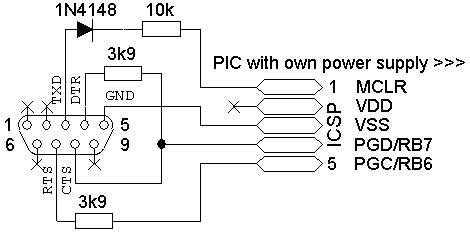
The JDM Programmer is a High-Voltage Programmer which is connected to the serial port (COM port) of the PC. It takes the programming voltage directly from the PC's COM port, so no separate power supply is needed. Due to the reason that the power supply is taken from the COM-port, for "weak" COM ports (especially in Notebooks) this could be a problem. So in this case the COM port could not provide a sufficent programming voltage and programming will fail.
Please note that this programmer will not work with a USB-to-Serial adapter.
Schematics / Layouts
Note: To allow programming of PIC 12F629 / 12F675 / ... it is necessary to modify the original JDM programmer as shown in the schematic above. This modification allows VCC control which is necessary for this PICs.
For more details see http://users.tpg.com.au/btkelly/jdm_b.htm.
Olimex PIC-PG2 Programmer
Description
PIC-PG2 is programmer based on JDM design which takes all necessary signals and power supply from RS232 serial port. It supports 8, 18, 28 and 40 pin PIC microcontrollers.
Schematics / Layouts
Supported PICs
This programmer supports all PICs which can be programmed in High-Voltage mode. For a list of all PICs supported by PICPgm Software can be found
here.
Note: PICs which need VCC contol (like 12F629 / 12F675 / ...) might not work with this programmer. Read more regarding this problem at the
JDM Programmer.
Pictures

Olimex PIC-PG3 Programmer
Description
PIC-PG3 is programmer based on D.Tait's parallel port design. To operate it needs external power supply 12-15VAC or 16-18VDC. It supports all 8/18/28 and 40 pin PIC microcontrollers which allow serial programming. PIC-PG3 have connector and cable for ICSP programming and can be used to program all PIC-PxxB prototype boards.
Important note:
For this programmer the programmer autodetection feature has to be deactivated (Menu: Hardware - Hardware Selection/Configuration...) by directly selecting the Olimex PIC-PG3 programmer. Reason for this is that this programmer has overlapping MCLR pins depending on the IC sockets which could cause Vpp on a PIC port pin different than MCLR pin. Due to that also the corresponding Olimex PIC-PG3 programmer type has to be selected. I.e. if you want to program a 8, 14 or 18 pin PIC, you have to select the "Olimex PIC-PG3 (8pin, 14pin, 18pin)" programmer. To program a 28 or 40 pin PIC you have to select "Olimex PIC-PG3 (28pin, 40pin)".
Schematics / Layouts
Pictures, Further Notes
To program a 8, 14 or 18 pin PIC, you have to select the "Olimex PIC-PG3 (8pin, 14pin, 18pin)" programmer in the Hardware settings.
To program a 28 or 40 pin PIC, you have to select the "Olimex PIC-PG3 (28pin, 40pin)" programmer in the Hardware settings.
El Cheapo PICmicro Programmer
Description
Schematics / Layouts
TLVP - Trivial LVP programmer
Description
Schematics / Layouts
P16PRO40 PIC-programmer
Description
Schematics / Layouts